

A USB-B to USB-C cable connects a modern laptop, tablet or phone, which only has small USB-C ports, to a desktop DAC, which almost always has the large square USB-B socket. It is a completely standard combination, because the connector shapes changed while the audio standard stayed the same: the DAC still speaks USB 2.0, and the cable simply adapts the shape at one end. Buy one proper cable rather than stacking adapters, and buy it in the length your desk actually needs.
Why your DAC still has a square socket
Visitors regularly ask why a serious DAC in 2026 wears the same USB-B port as a 2004 printer. The reasons are practical. USB-B is physically large, which means generous contact area and a firm mechanical grip that will not wobble when a heavy audiophile cable hangs off it. Panel space is free on a full width component, so the size costs nothing. And the installed base matters: DACs live in systems for decades, and a USB-B socket keeps them compatible with thirty years of cables and computers. On portable DACs, where every millimetre counts, USB-C has rightly taken over. On the desktop, expect the square socket to outlive us all.
One reassurance worth stating plainly: the socket shape says nothing about capability. A DAC with a USB-B port and a USB 2.0 receiver handles every audio format that matters, up to 32 bit, 768kHz PCM and DSD512 where the chipset allows, because high resolution audio needs only a fraction of USB 2.0's bandwidth. You are not missing out on anything by using the square socket. You just need the right shaped cable.
When a USB-C to USB-B cable is the answer
The pattern is the same in almost every modern setup. The computer got thinner and lost its USB-A ports; the DAC kept its square socket. The specific cases:
- A recent laptop with only USB-C or Thunderbolt ports feeding a desktop DAC. Thunderbolt and USB4 ports accept ordinary USB-C cables for USB 2.0 audio traffic, so a straightforward C to B cable is all you need.
- A phone or tablet as the source. USB-C iPhones and iPads and most Android devices will drive a USB Audio Class DAC directly, though some DACs draw more power than a phone likes to supply, in which case a powered hub in between solves it. Older Lightning iPhones need Apple's camera adapter in the chain, which is the one case where an extra joint is genuinely unavoidable.
- A streamer or mini PC with USB-C output into a full size DAC, increasingly common as compact computers shrink their port selection.
Adapters versus a proper cable
The temptation is a five dollar USB-C to USB-A adapter on the end of an existing A to B lead, and we understand it, because we have a drawer of them on the bench for testing. As a permanent solution it has real costs. Every adapter adds two more plug and socket joints to the link, and joints are where contact resistance, oxidation and mechanical looseness live. Adapters hanging off a DAC's rear panel also lever the socket sideways under the weight of the cable, which is hard on hardware designed for a straight plug. Worst of all, the cheapest adapters are unwired for anything beyond basic data and occasionally cause exactly the intermittent dropouts people then blame on the DAC.
A single USB-C to USB-B cable replaces the whole chain with two connectors and one continuous, shielded run. It costs less than the troubleshooting time the adapter route eventually burns, and it is the answer we give across the counter every time this question comes up. Keep the adapter for emergencies; do not build a system on one.
One software note while we are here, because no cable fixes a misconfigured computer. Modern DACs are USB Audio Class 2 devices, which macOS, Linux, iOS and Android support natively. Windows covers the basics, but most DAC makers supply a dedicated driver that unlocks the unit's full resolution, and installing it is worth the five minutes. Whatever the platform, set the music software to give the DAC exclusive control of the device so the operating system stops resampling everything to its own preferred rate.
What matters inside the cable
Since the data either arrives or it does not, what separates a serious USB audio cable from a generic lead is everything around the data. Four things, in order of importance.
Conductor quality on the data pair. The differential pair carries the music at 480Mbps, and high purity, well insulated copper keeps the waveform edges clean enough for the receiver to read without strain. Separation of data and power. The same cable carries 5 volts of noisy computer power millimetres from the data pair; serious designs give the power line its own conductor geometry and distance. Shielding. A proper aluminium wrap plus a dense copper braid keeps the computer's high frequency hash inside the cable and the room's interference out of it. Connectors. Firm, precisely machined plugs with proper plating, because the joint is where cheap cables fail first, mechanically years before they fail electrically.
The Zonotone Grandio USB-2.0, from $339, illustrates all four. Its data pair runs on ultrapure 6NCu and PCUHD copper with silver plated OFC, the power leg is a separate robust OFC conductor, shielding is a thick aluminium wrap under a dense tin plated copper braid, and Zonotone offers all four termination combinations including C to B, so a USB-C laptop meets a USB-B DAC in one cable with no adapter anywhere. It is available in 1.2 and 2.0 metres, with 0.6 metre on request for desktop stacks.
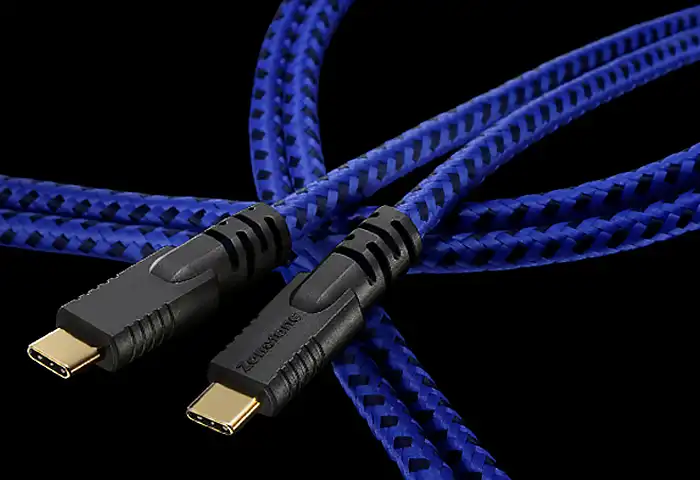
What should you expect to hear? Nothing added, and that is the point. A well built USB link into a good DAC shows up as the absence of a problem: no faint hardness in the upper midrange when the music gets dense, no sense of the soundstage flattening under load, none of the intermittent ticks that send people shopping for new DACs. It is a subtle correction rather than a transformation, which is precisely why so many people live with the printer lead for years.
Our recommendation
Modern laptop or phone into a desktop DAC: buy one proper USB-C to USB-B cable, in the shortest length the desk allows, and leave the adapters in the drawer. The Grandio USB-2.0 is our premium pick, and our custom builds on Oyaide digital wire cover the middle ground, cut to your exact length. Both sit in our digital cables category. If you tell us the source, the DAC and the distance between them on the custom order form, we will spec and quote the single cable that does the job properly.