

For USB audio, buy the shortest cable your setup genuinely allows, ideally under two metres, whatever connector shape your DAC wears. A short USB C cable or USB-B lead keeps the high speed data signal clean, keeps the 5 volt supply line from sagging, and removes metres of unnecessary antenna from beside your other cables. Past about two metres nothing dramatic happens, but the engineering margins start shrinking, and by five metres you are at the limit of the USB 2.0 specification itself.
That advice surprises people who have been told digital cables cannot matter, so let us be precise about why length specifically does, and then look at what to buy for a desktop DAC.
Why USB audio wants short runs
A USB cable is doing two jobs at once. The twisted data pair carries the music at 480 megabits per second in USB 2.0, fast enough that the signal behaves like a radio transmission, with rise times and waveform edges the receiver has to read cleanly. Alongside it, a separate pair of wires carries 5 volts of power and ground from the computer, feeding the DAC's USB receiver and, in bus powered portable DACs, the entire device.
Length degrades both jobs. Every metre of cable attenuates the data signal and blurs its edges a little further, and every metre adds resistance to the power line, dropping the voltage that arrives at the far end. Neither failure is gradual at the listening chair. The data side fails digitally: dropouts, clicks, a DAC that intermittently vanishes from the computer's device list, or a link that works at 44.1kHz and stutters at 384kHz or DSD. The power side fails silently: a bus powered DAC running on 4.6 volts instead of 5 simply performs below its design, and you would never know why.
There is a third, quieter reason we favour short runs in hi-fi specifically. A USB cable lying alongside interconnects and power cords is an antenna, and the computer end of it is electrically noisy. Less cable means less coupling into everything else in the rack. A tidy one metre lead is not an aesthetic preference; it is the engineering answer.
What actually happens past two metres
Nothing catastrophic, and honesty matters here. The USB 2.0 specification certifies cables to five metres, and a well made three metre cable into a mains powered desktop DAC will usually work flawlessly. We say usually, because the margin is now shared between the cable, the computer's USB port and the DAC's receiver, and you only find out where the tolerance ran out when something stutters during a high resolution file. Past two metres you are also relying more heavily on the cable's construction: conductor gauge, shielding and connector quality stop being nice to have and start being load bearing.
Two setups deserve special warnings. Passive USB extension leads and daisy chained adapters are the most common cause of USB audio dropouts we troubleshoot, because every joint adds loss and every added segment eats the margin. And if the computer genuinely must live across the room, the correct answer is not a heroic five metre USB cable; it is a small streamer or a networked endpoint near the DAC, fed by Ethernet or WiFi, with a short USB lead doing the last metre. Digital audio over distance is a solved problem, and USB is not the solution.
A bench anecdote makes the point better than any specification. A customer brought in a DAC that kept vanishing from his laptop mid album, convinced the DAC was faulty. The chain was a two metre cable, a passive extension and an adapter, roughly four metres and four joints in total. We replaced it with a single one metre lead on the spot and the problem has not recurred. The DAC was never broken; the margin was simply spent before the music started.
USB-C versus USB-B: shape is not spec
Half the confusion in this category comes from treating USB-C as a speed. It is not. USB-C is a connector shape, the small reversible oval on modern laptops and phones, and a cable ending in USB-C can carry anything from 1990s USB 1.1 traffic to 40Gbps USB4. USB-B is the large square socket on the back of nearly every desktop DAC, chosen for its generous contact area and firm grip on heavy cables. Neither shape implies a speed, and for audio none of the speed matters: even DSD512 fits comfortably inside USB 2.0's bandwidth, which is what virtually every DAC speaks regardless of the socket it wears.
What the shape does determine is the cable you need. A modern laptop with only USB-C ports feeding a desktop DAC wants a USB-C to USB-B cable, and the shortest one the desk allows. A desktop tower with classic USB-A ports wants A to B. A phone or portable DAC wants C to C. Buy the cable for the sockets you actually have rather than collecting adapters, because every adapter is two more joints in a link where joints are the weakness.
What to buy for a desktop DAC
The textbook answer is the Zonotone Grandio USB-2.0, from $339, and its length options tell you what Zonotone thinks about this topic: the standard cable is 1.2 metres, a 2.0 metre version is the longest offered, and a 0.6 metre is available on request for stacked desktop rigs. Inside, the data pair runs on ultrapure 6NCu and PCUHD copper with silver plated OFC alongside, while the 5 volt power line is a separate, robust OFC conductor, physically distancing the noisy power leg from the data. Each conductor is insulated in high purity polyethylene, the whole cable is double shielded with a thick aluminium wrap under a dense tin plated copper braid, and natural cotton filler keeps the internal geometry stable so the cable behaves the same coiled in transit as it does behind your rack. All four termination combinations are offered, A to B, A to C, C to B and C to C, so a USB-C laptop and a USB-B DAC meet without an adapter in sight.
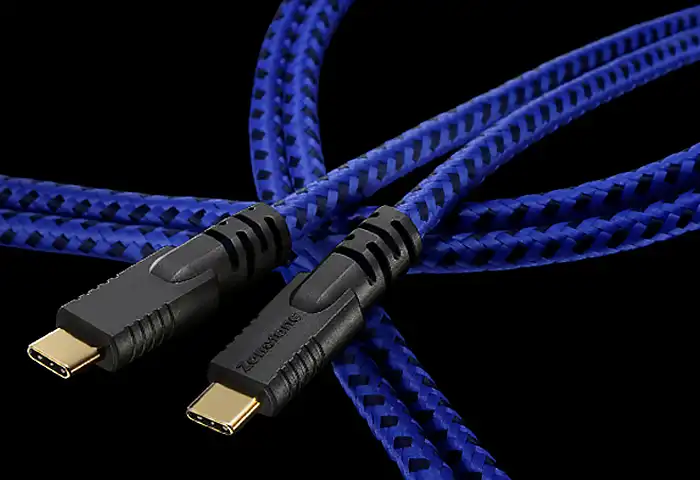
In the middle of the range, we build custom USB leads on Oyaide digital wire, terminated and tested on the same bench as the rest of the catalogue. A made to order build lets us cut exactly the length between your computer and your DAC, which is the whole point of this guide: we would rather make you a precise 0.8 metre cable than sell you a coiled two metre one.
Whatever you buy, measure the run first. Put the computer and the DAC where they will actually live, run a piece of string along the path the cable will take, and add half a metre of slack for pulling the rack out. That number, rounded up to a sane length, is what to order. Coiling the spare behind the amplifier tidies the shelf and undoes the electrical point of buying short.
Our recommendation
Desktop DAC beside a computer: a short, properly built USB cable in the termination your sockets demand, and the Grandio USB-2.0 is the one to aspire to. Longer distances: rethink the topology rather than the cable. The Grandio and our custom USB builds sit alongside the coaxial and AES designs in our digital cables category, and if you tell us the computer, the DAC and the exact distance between them on the custom order form, we will quote the right cable at the right length the first time.