

Which USB cable does a DAC need? Almost always a USB-A to USB-B lead: the flat rectangular plug at the computer end and the big square plug at the DAC end. Newer portable DACs use USB-C, and despite the naming confusion, USB4 is a speed specification rather than a new connector, and one your audio DAC does not need. The cable types are simple once untangled, and this guide does the untangling, then answers the question we hear weekly: does the cable itself matter, or will the printer lead from the study do?
USB cable types, untangled
The confusion comes from the fact that USB describes two separate things at once: a shape of connector and a version of the underlying standard. The shapes first:
- USB-A is the flat rectangle on computers, chargers and streamers. It is the host end of the cable, and it has survived every version of the standard since 1996.
- USB-B is the large square plug found on full size DACs, printers and audio interfaces. Its smaller relatives, mini-B and micro-B, served a generation of portable gear and are best forgotten.
- USB-C is the small reversible oval that replaced everything on phones and laptops, and it now appears on portable DACs and some desktop units. It is a connector shape only; a USB-C cable can carry anything from ancient USB 2.0 to 40Gbps traffic.
The versions are the second axis. USB 2.0 runs at 480Mbps, USB 3.x climbs from 5Gbps upward, and USB4 reaches 40Gbps and beyond. Here is the fact that untangles the whole topic for audio: high resolution music needs only a fraction of USB 2.0's bandwidth. Even DSD512, the heaviest format in domestic use, fits inside it with room to spare. No DAC needs USB 3, let alone USB4, and most DAC hardware speaks USB 2.0 regardless of the socket it wears. A USB4 cable is a magnificent solution to a problem audio does not have.
Why DACs still use USB-B
Visitors often ask why a five thousand dollar DAC in 2026 still wears the same square socket as a 2004 inkjet. The reasons are practical rather than nostalgic. USB-B is big, which means a generous contact area and a firm mechanical grip that will not wiggle loose when a heavy audiophile cable is hanging off it. Its size is no burden on a full width component, where panel space is free. And the installed base matters: DACs live in systems for decades, and a USB-B socket keeps them compatible with thirty years of cables and computers. USB-C is the right answer for portable DACs where every millimetre counts, and we expect it to keep spreading at the budget end, but on desktop equipment the square plug will outlive us all.
A practical note on combinations: the cable you need is defined by both ends. A computer with USB-A into a desktop DAC is A to B. A laptop with only USB-C into a desktop DAC is C to B. A phone into a portable DAC is usually C to C. A well stocked workshop should be able to build any of them, and ours can.
Why the printer cable is not ideal
Let us be precise, because this is where the argument usually goes wrong. USB audio is not analogue; the data either arrives or it does not, and a cheap compliant cable will deliver the bits correctly over short distances. If your printer lead works, it is not damaging anything, and nobody's DAC has ever exploded from using one. The honest case against it is quieter and more specific.
A USB cable carries two things at once: the differential data pair and a 5 volt power line with its ground return. In a generic cable these share one lightly shielded jacket, and the noisy 5V line, fed straight from your computer's switch mode power supply, sits millimetres from the data pair for the entire run. High frequency noise from the computer travels down both. The DAC's USB receiver then has to reject that noise before its clock and converters ever see the music, and in an asynchronous USB link, where the DAC's own clock governs timing, whatever noise survives lands right next to the most jitter sensitive circuitry in the box. Add thin conductors, minimal shielding and connectors moulded to a price, and the printer cable turns out to be exactly what it costs: adequate for documents, indifferent to music.
What does that cost at the listening chair? In our experience, a generic USB lead into a good DAC shows up as a slight hardness in the upper midrange and a soundstage that flattens when the music gets busy, the signature of a receiver working harder than it should. It is a subtle degradation rather than a catastrophe, which is exactly why people live with it for years.
Do drivers and settings matter?
A brief software note, because the best cable in the world cannot fix a misconfigured computer. Modern DACs are USB Audio Class 2 devices, which macOS and Linux support natively; Windows 10 and 11 cover the basics, but most manufacturers supply a dedicated driver that unlocks the DAC's full resolution and its ASIO path, and installing it is worth the five minutes. Whatever the platform, give the DAC exclusive control of the audio device (exclusive mode in Windows, integer or hog mode on the Mac) so the operating system stops resampling your music to its own preferred rate, and set the output to the highest sample rate the DAC supports. Then, and only then, does the cable conversation become worth having.
What a serious USB cable does differently
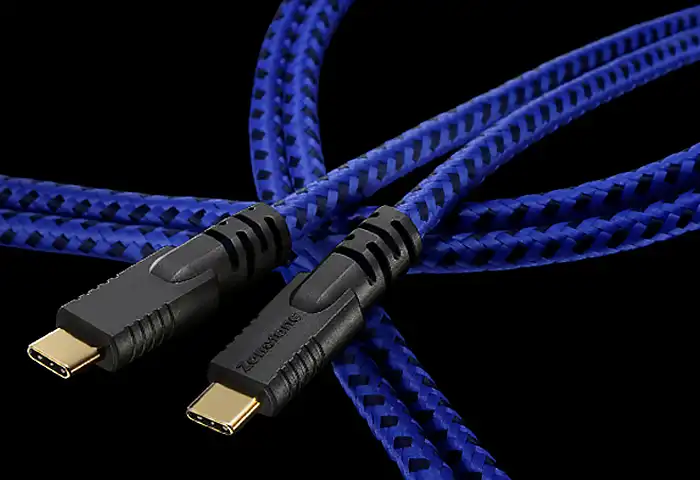
The Zonotone Grandio USB-2.0, from $339, is our premium pick and a good illustration of the engineering involved. The data pair runs on ultrapure 6NCu and PCUHD copper with silver plated OFC alongside, while the 5V power line is a separate, robust OFC conductor with its own geometry, physically distancing the noisy power leg from the data. Shielding is taken seriously across the whole run, and Zonotone offers all four termination combinations (A to B, A to C, C to B and C to C), so a USB-C laptop and a USB-B DAC need no adapters. Between a laptop and our reference DAC, the effect was the familiar signature of a good digital link: not more detail, but less confusion, with the edgy top of poorly recorded tracks reduced to what the engineer left on the tape.
In the middle of the range, we build custom USB leads using Oyaide digital wire and connectors, terminated and tested on the same bench as the rest of the catalogue. Oyaide's digital range is built around precision conductors and scrupulous shielding, the same 102SSC copper that runs through its power and speaker cables, and a made to order Oyaide based USB build is the sensible step between the printer lead and the Grandio. Length is part of the service: USB 2.0 is specified to five metres, but for audio we recommend the shortest run your rack allows, and we would rather build you a tidy one metre cable than sell you a coiled three metre one.
Our recommendation
Computer into a desktop DAC: A to B, shortest sensible length, built properly. The Grandio USB-2.0 is the one to aspire to, a custom Oyaide based build covers the middle, and both sit alongside our coaxial and AES cables in the digital cables category. Tell us the computer, the DAC and the distance through the custom order form and we will quote the exact cable, connectors and length, because that is the whole point of buying custom.